Day Trading Workcentre
Everything for the trading day, in one window
Your rules, your journal and your charts, side by side.
This is a real desk in PlexiiDesk, the Day Trading Workcentre: a game plan, hard rules, a trade journal, a watchlist and live market pages, tiled together in one window. Download the app and build your own from the list below.
Try this desk in your browserOpens a working copy. No account, nothing to install.
Free for personal use. Mac and Windows. Mac 4.3.45 · Windows 4.3.45
What is on the desk
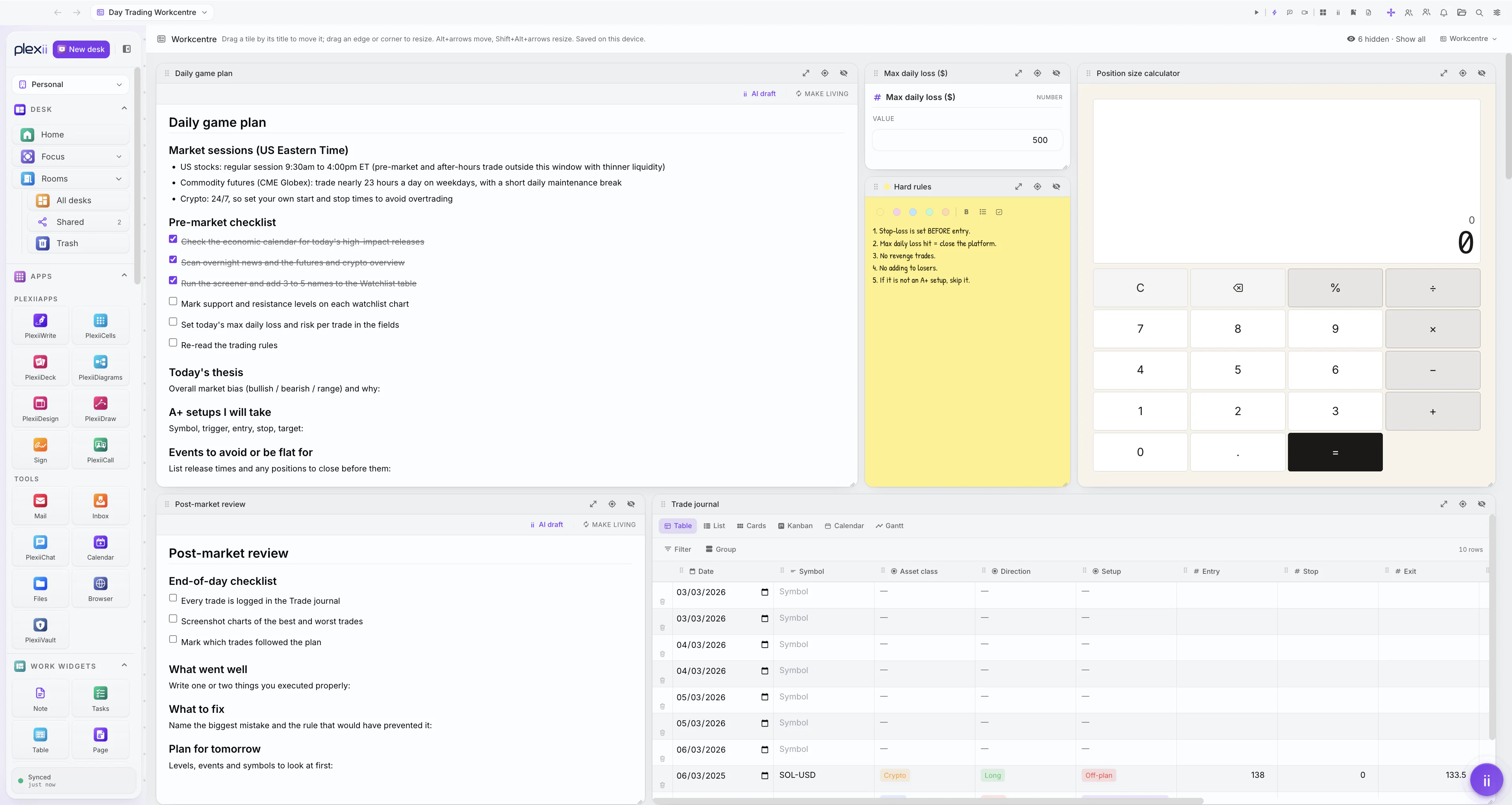
Daily game plan
PageMarket sessions, a pre-market checklist you tick off, today’s thesis, the setups you will take and the events to stay out of.
Max daily loss ($)
Field, numberOne number, in view all day.
Hard rules
StickyYour rules, short and yellow, next to everything else.
Position size calculator
CalcA calculator beside the rules, for working out size before you enter.
Trade journal
TableOne row per trade: date, symbol, asset class, direction, setup, entry, stop and exit. The same rows show as Table, List, Cards, Kanban, Calendar or Gantt.
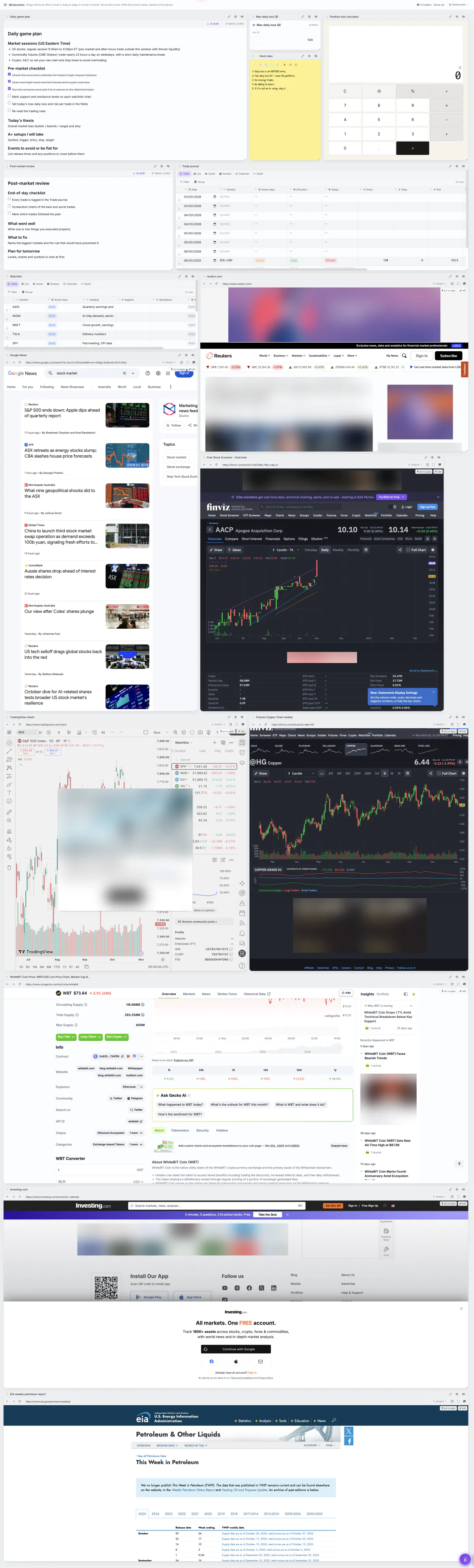
Watchlist
TableEach symbol with its catalyst, support and resistance.
Post-market review
PageAn end-of-day checklist, what went well, what to fix and the plan for tomorrow.
Market pages
BrowserEight browser work widgets, each a live website: TradingView charts, the Finviz screener and copper futures, Reuters, Google News, the Investing.com economic calendar, CoinGecko and the U.S. EIA weekly petroleum page.
Both pages have AI draft, which writes a section you review before it goes in, and Make living, which turns a page into a summary that keeps up with the rest of the desk. These use Plexii’s AI, which runs on Plexii credits or your own Anthropic key: how AI is paid for.
Tiled in the Workcentre
Workcentre is a view of a desk. It lays every work widget out as a tile on one grid, and each tile shows all of its content, so nothing sits behind a tab you have to find mid-session.
Drag a tile by its title to move it, and pull an edge to resize it. Hide the tiles you do not need today: they stay on the desk, and Show all brings them back. The layout is saved on your computer.
See the whole desk
The screenshot above is the top of the desk. Here is all of it, top to bottom: the planning tiles, then the watchlist and the market pages. Scroll inside the frame, or open it full size.
Build this desk
Every work widget is in the Work widgets section of the side menu, some of them under Other work widgets. Drag one onto the desk, or right-click it and choose Add to this desk. Rename a work widget by double-clicking its name.
Download PlexiiDesk and sign in. Click New desk and call it Day Trading Workcentre. Create a desk
- Page
Daily game plan. Type / for headings and a to-do list for the pre-market checklist. Page guide
- Field
Max daily loss ($). Choose Number as its type. Field guide
- Sticky
Hard rules. One rule per line. Sticky guide
- Calc
Position size calculator. Calc guide
- Table
Trade journal, then a second Table for the Watchlist. Add the columns you log, and use the views along the top of the table to see the same rows as a list, cards, a board or a calendar. Table guide
- Page
Post-market review, with your end-of-day checklist.
- Browser
One for each site you check, with its address typed in: your charts, screener, news and calendar. Browser guide
Open the view menu at the top of the desk and choose Workcentre. Drag the tiles into the order you work in, and resize them until each one shows what you need. Desk views
The small print
TradingView, Finviz, Reuters, Google News, Investing.com, CoinGecko and the U.S. Energy Information Administration (EIA) are their own websites, shown as they appear in Plexii’s browser work widgets. Plexii is not affiliated with them.
Plexii is a workspace app, not a broker, and gives no financial advice. The checklists, rules and table rows on this desk are examples.