How to check an AI answer before you rely on it
AI can state wrong things confidently, even with citations. A quick routine for checking an answer against its sources before you act on it.
To check an AI answer before you rely on it, treat it as a first draft from a quick, confident colleague who sometimes gets things wrong. Ground the question in material you trust, open the sources it cites, check the numbers, names and quotes first, and notice what the answer leaves out. For most everyday questions that takes a few minutes, and it is far quicker than finding out later in front of a client.
This guide explains why confident answers can still be wrong, then sets out a routine you can use with any AI tool, and shows how we built Plexii, the assistant in PlexiDesk, to make that routine quick.
Why confident answers can still be wrong
The US National Institute of Standards and Technology (NIST) has a name for the problem. Its Generative AI Profile (opens in a new tab) (NIST AI 600-1, July 2024) defines confabulation as "the production of confidently stated but erroneous or false content (known colloquially as 'hallucinations' or 'fabrications') by which users may be misled or deceived."
NIST also explains why it happens. Generative models "generate outputs that approximate the statistical distribution of their training data", and while that can produce accurate answers, "it can also produce outputs that are factually inaccurate or internally inconsistent." The tone of the answer tells you nothing about which kind you have. A wrong answer reads as smoothly as a right one.
Citations don't settle it either. In NIST's words, "GAI outputs may also include confabulated logic or citations that purport to justify or explain the system's answer, which may further mislead humans into inappropriately trusting the system's output." A list of sources is only reassuring if the sources exist and say what the answer claims. To know that, you have to open them.
Ground the question in your own material
Some wrong answers can be prevented before you ask. An AI that doesn't have the right material has to fill the gap somehow, so give it documents you trust rather than asking it to answer from general knowledge.
- Point it at the material. Attach or name the report, the contract or the spreadsheet you mean, rather than describing it.
- Ask it to answer from that material only, and to say so if the answer isn't there.
- Ask narrow questions. "What notice period does clause 12 give?" is easier to answer and to check than "Summarise our obligations." NIST notes that the problem is "particularly relevant when it comes to open-ended prompts for long-form responses and in domains which require highly contextual and/or domain expertise."
This is how we built Plexii. It answers from your own work: the desk you are on, your documents, spreadsheets and decks, tables, notes, files, meeting transcripts and earlier Plexii conversations. With live web search, which is on Pro and Team and in the 14-day trial every new account gets, it searches the web as well. To point it at one particular thing, type @ in its message box and pick the desk, document or widget, and Plexii reads what you mention before it answers. See Meet Plexii, your assistant and Link desks, widgets and people with @, or the overview of an assistant that shows its sources.
Open the sources, don't just count them
Three citations under an answer can feel like a lot of evidence. It is only evidence once you have looked. A quick routine:
- Open at least two of the sources, starting with the one behind the claim you're most likely to act on.
- Find the sentence that supports the claim. If you can't find it in a minute, treat the claim as unsupported.
- Check the source says that, and not something close to it. "Up to 30 days" and "30 days" are different claims.
- Check it's the right version. An old draft or last year's figures can be quoted perfectly and still be wrong for today.
- Follow summaries back to the original. If the source is itself a summary, or an earlier AI conversation, go to the document behind it.
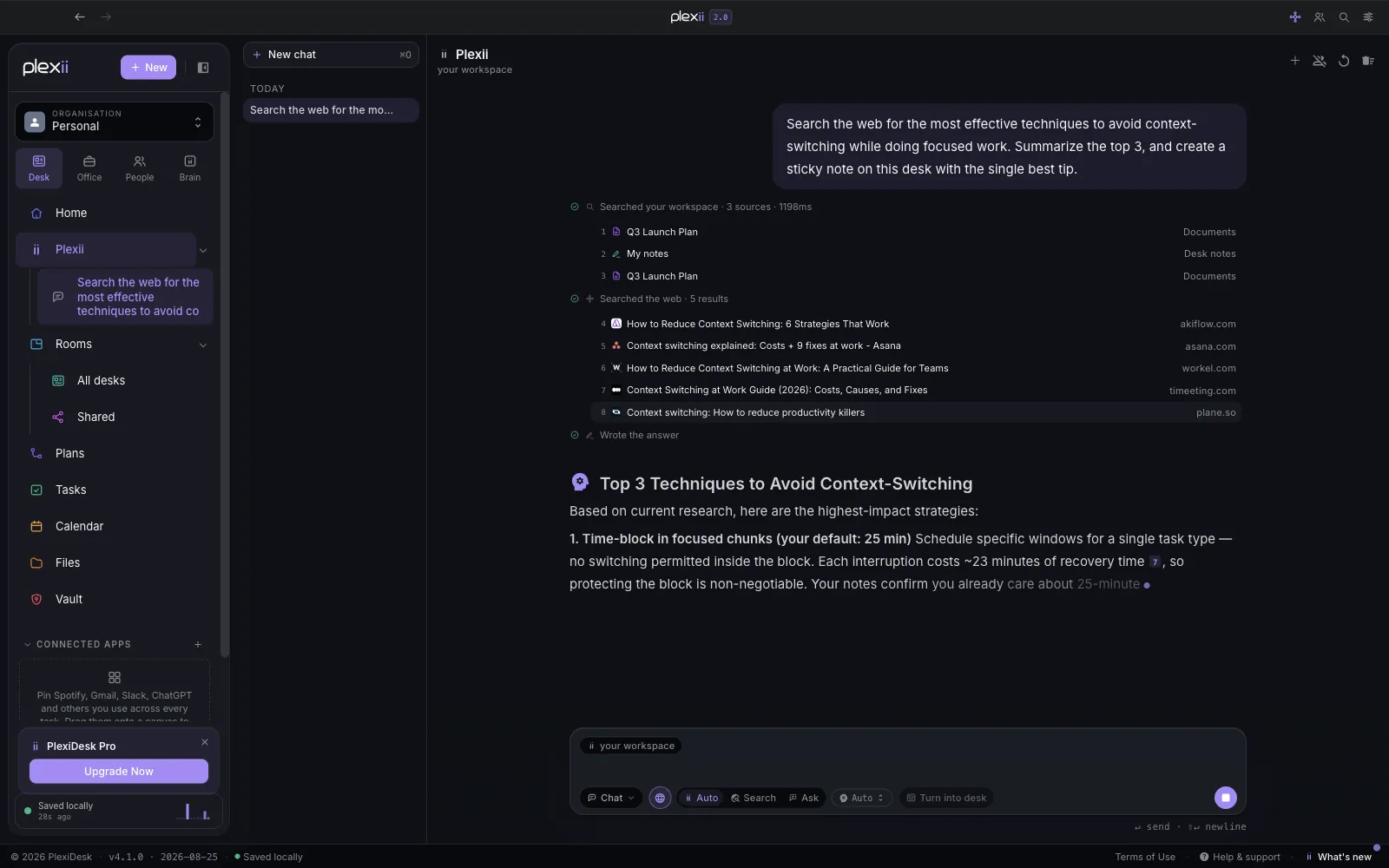
In PlexiDesk, every Plexii answer lists the sources it used, and you can open any of them to check. While it works, a trace shows what it read, and you can open sources from there too. Plexii can draw on your earlier conversations as sources, so when a citation points to a past chat, follow it to the document behind that chat. Deleting a conversation stops Plexii using it as a source in later answers. It also helps to open the Plexii panel in Sidebar mode: the rest of the screen moves over to make room, so the answer and the document you're checking sit side by side.
Check numbers, names and quotes first
You rarely need to check every word. Check the details that are most likely to be wrong and most costly if they are:
- Numbers. Totals, percentages, dates and amounts. If the answer added things up, add them up again.
- Names. People, organisations, products and places, including spelling and job titles.
- Quotes. Anything in quotation marks should match the source word for word.
- Anything with a consequence. Deadlines, prices, terms, obligations and anything legal or financial.
If a number or quote has no source you can open, treat it as unverified, however plausible it looks. Either find the source yourself or leave it out.
Notice what the answer doesn't cover
An answer can be accurate in every sentence and still mislead you, by going beyond its sources or by leaving out the part that matters. The first of those is part of what NIST describes: confabulations "also include generated outputs that diverge from the prompts or other input or that contradict previously generated statements in the same context."
Before you act, ask:
- Did it answer the question I asked, or a nearby, easier one?
- Does it say anything the sources don't? Conclusions, recommendations and "this means" sentences are where an answer is most likely to go beyond its evidence.
- What's missing? Is the latest document included? Is there a source you expected to see that isn't there?
- Would one more fact change the conclusion? If so, find it before you rely on the answer.
Value the answer "I couldn't find that". It's more useful than a confident guess, because it tells you something true: the material isn't there, or isn't where the AI looked. Plexii says so plainly when it can't find something in your workspace. When that happens, check whether the material is in PlexiDesk at all, or whether it's under a different name, and try again with an @ mention of the right document.
Make checking a habit, not a chore
Checking becomes routine when it's proportionate. Match the effort to what's at stake:
- Low stakes, such as brainstorming or a first outline: skim it, and use what's useful.
- Medium stakes, such as an internal summary or a draft for a colleague: open one source and check the numbers and names.
- High stakes, such as anything a client, a regulator or your finance team will see: check every claim you keep, against its source.
A few habits make this quicker over time:
- Keep one topic per conversation, so the record of what you asked and what came back is easy to find later. In PlexiDesk, Your conversations keeps every chat, named after its first message, with a search box.
- Correct the source, not just the answer. If the AI was wrong because a document was out of date, fix the document, and the next answer starts from better material.
- Say what you checked. When you pass an AI-assisted summary on, a line like "figures checked against the October sheet" tells the reader how much to rely on it.
No assistant is right every time, Plexii included, and we don't claim otherwise. That's why we built it to be checked, and to make checking take minutes: answers drawn from your own work, sources you can open, a trace of what it read and a plain "I couldn't find that" when the material isn't there. Our post Show your sources, ask before you act explains the two rules behind that design, and Human in the loop: let AI draft the change, keep the decision covers the next step, deciding which changes an AI may make.
To see how it works on your own kind of work, build a desk for your role in the interactive demo, or read more about Plexii and its sources.