PlexiiLite vs Commander One: a two-pane commander, or a look inside your files?
Commander One is a two-pane file manager with custom hotkeys. PlexiiLite shows what is in each file.
PlexiiLite is a Mac app. Open this page on your Mac to download it.
Short answer
Commander One, from Electronic Team, is a dual-pane file manager for macOS with unlimited tabs and custom hotkeys, and a PRO Pack that adds connections to FTP, SFTP, WebDAV and cloud storage, device mounting, a terminal and more. PlexiiLite is a Mac app that turns a folder into a room of tiles that show what is in each file, and lets you read, edit and search inside them. Pick Commander One for two panes and the keyboard; pick PlexiiLite to see and work inside your files.
What Commander One does really well
Commander One is a classic dual-pane file manager with unlimited tabs, custom keyboard shortcuts, an operations queue, hidden files and Spotlight search. Its PRO Pack adds a connection manager for FTP, SFTP, FTPS, WebDAV, Amazon S3, Google Drive, Dropbox, OneDrive and other services, mounting iOS, Android and MTP devices, a terminal emulator, a process viewer, themes and fuller archive support. It runs on macOS 10.13 or later.
What PlexiiLite is for
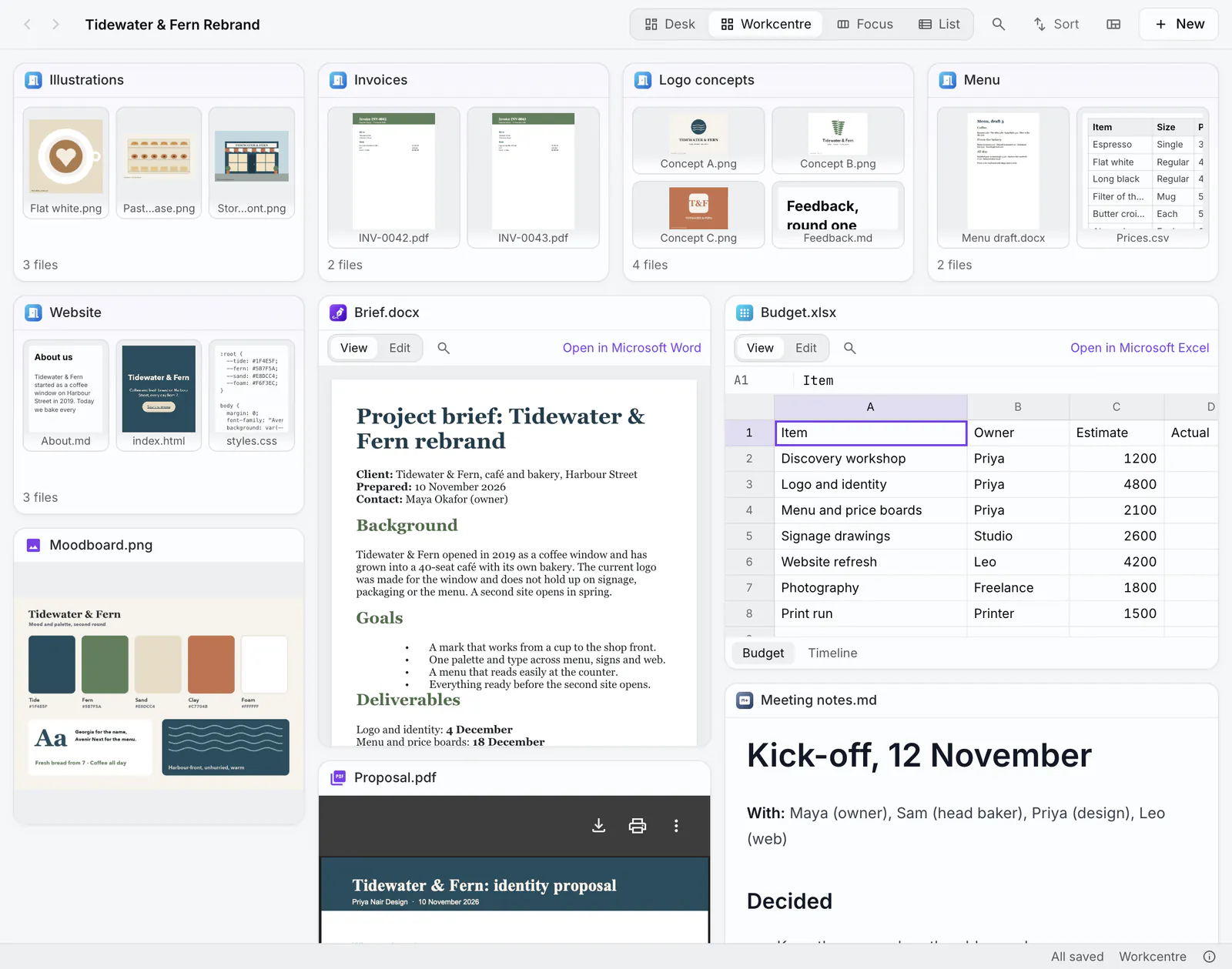
PlexiiLite is a visual file explorer for your Mac, from the makers of Plexii. Open a folder and it becomes a room: every file is a tile that shows what is in it, and every folder is a door you can see into. You read, edit and find inside your files right where they are, and the files stay in the folders they are in.
PlexiiLite and Commander One side by side
Commander One details checked 13 Nov 2026 on its maker's own pages (listed at the end).
| Question | PlexiiLite | Commander One |
|---|---|---|
| What it is | A visual file explorer: a folder becomes a room, every file a tile that shows what is in it. | A dual-pane file manager for macOS, from Electronic Team. |
| Price | Free to download and use. | A free app, with a paid PRO Pack for more features. |
| Layout | Desk, Workcentre, Focus and List views, in windows and tabs. | Two panels with unlimited tabs, custom hotkeys and an operations queue. |
| Servers and cloud | Opens the folders your Mac can reach. It has no server connections of its own. | In the PRO Pack: FTP, SFTP, FTPS, WebDAV, Amazon S3, Google Drive, Dropbox, OneDrive, Box, Backblaze B2, MEGA, pCloud and OpenStack. |
| Seeing inside files | Pictures, videos, PDFs, Markdown, code, Word documents, spreadsheets, presentations and web links open inside their tiles. | Quick Look previews, and a viewer for hex, binary, text, media, image and HTML files. |
| Editing | Word, Excel, PowerPoint and CSV edited in place; pictures and PDF markup; Markdown beside its preview. | Open and edit files on connected servers and cloud storage. |
| Finding | By name across open folders (⌘P) and the words inside files (⇧⌘F), including words in pictures and scans. | Spotlight search, file contents search and regular expressions. |
| Archives | Compress and Expand .zip files. | ZIP, 7z, TAR and more; RAR read-only. Some archive features are in the PRO Pack. |
| Devices and extras | A terminal in the window, git changes and history, and AI with your own Anthropic key. | In the PRO Pack: mount iOS, Android and MTP devices, a terminal emulator and a process viewer. |
| Runs on | Macs with Apple Silicon or Intel, on macOS 12 Monterey or later. | macOS 10.13 or later. |
When to stay with Commander One
Stay with Commander One if you work from the keyboard in two panes, or need FTP, SFTP, cloud storage or phones mounted as drives.
When to try PlexiiLite
Try PlexiiLite when you want to see what is in your files at a glance and work inside them: documents, sheets, pictures and PDFs edited in place, and search that reaches the words in pictures and scans.
When PlexiiLite isn't the right fit
PlexiiLite isn't the right fit if you need two panes, remote connections, or a Mac older than macOS 12.
See inside your folders.
PlexiiLite is a Mac app. Open this page on your Mac to download it.
Questions
Is PlexiiLite a Commander One alternative?
For seeing and editing inside your files, yes. For two panes, the keyboard and remote connections, Commander One does more.
Does PlexiiLite connect to FTP or cloud storage?
No. It opens folders your Mac can already reach. Commander One connects to them in its PRO Pack.
Can I keep using both?
Yes. Both work on the files already on your Mac, and PlexiiLite keeps its layouts in its own data, not in your folders.
More comparisons: Finder alternatives for Mac.
Checked 13 Nov 2026 against each maker's own pages. Electronic Team: commander-one.com, Manage files, Manage archives, Manage clouds, electronic.us: Commander One, Mac App Store listing. PlexiiLite: plexiidesk.com/plexiilite (version 0.7.2). Features and plans change, so check each maker's site before you decide. Names are their owners' trademarks; this page is not made with or endorsed by them.