
Free for Mac, from the makers of Plexii
See inside your folders.
PlexiiLite is a visual file explorer for your Mac. Open a folder and it becomes a room: every file is a tile that shows what is in it, and every folder is a door you can see into. Read, edit and find inside your files right where they are.
PlexiiLite is a Mac app. Open this page on your Mac to download it.
For Macs with Apple Silicon or Intel, on macOS 12 Monterey or later. Version 0.7.2.
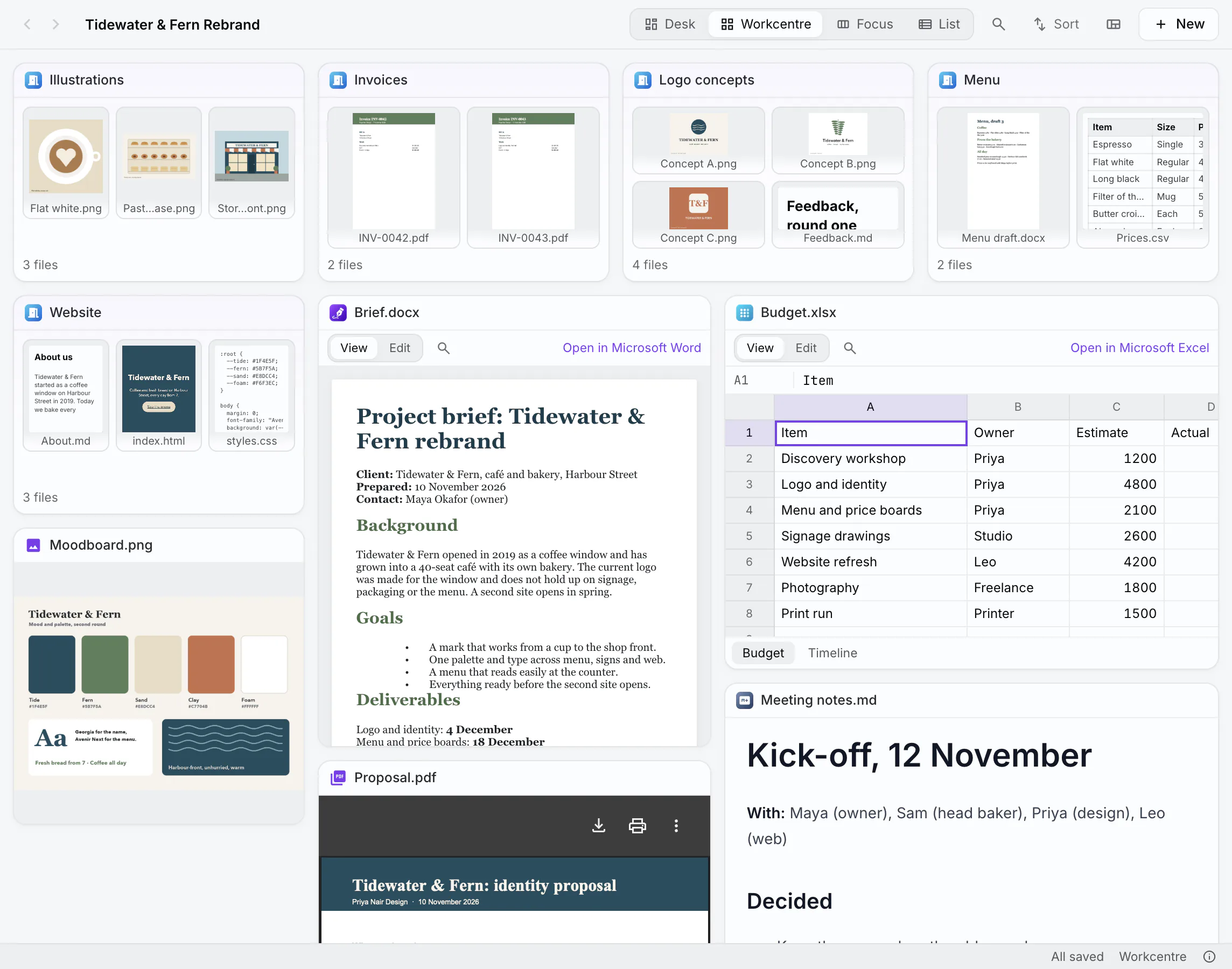
Workcentre: your folder becomes a room. Sub-folders are doors, and every file is a live tile.
Real screens of PlexiiLite, on a sample folder: the café, its people and its figures are made up.
How it works
Your folders as rooms. Your files as tiles.
Open any folder on your Mac. The folders inside it become rooms within the room, and nothing moves on disk until you move it.
Doors you can see into
A folder's tile shows every file inside it, as pictures, so you know what is there before you open it. A very full folder scrolls inside its door.
Every file shows what is in it
Pictures, videos, PDFs, Markdown, code, Word documents, spreadsheets, presentations and web links each open in the right viewer, inside their tile. Press Space for a larger look.
Find it as you type
⌘P finds any file or folder by name across the folders you have open. ⇧⌘F searches the words inside them, and ⌘F marks every match in the file you are reading.
A free canvas. Put each tile where you want it, and zoom out to see the whole room.
Tiles fill the window edge to edge and snap as you move them. Drop one in a gap and it shrinks to fit.
Up to four files side by side for close work, kept as a view you can come back to.
Name, date, size and kind in columns, as in Finder, with rooms that unfold in place.
Beside Finder
What PlexiiLite adds to the file manager you know.
Finder and File Explorer, the file managers built into macOS and Windows, do a great deal. PlexiiLite works beside Finder on your Mac and adds what a file manager leaves to other apps.
| When you want to | Finder or File Explorer | PlexiiLite |
|---|---|---|
| See what is in a folder | Open the folder | Its tile is a door that shows every file inside, as pictures |
| Read a PDF, play a video or scroll a sheet | Open it in its own app, or preview it | Right in its tile, beside the other files in the folder |
| Work on several files at once | Arrange their apps' windows side by side | Focus puts up to four side by side in one window, and keeps the arrangement as a view |
| Change a Word, Excel or PowerPoint file | Open it in an office app | Edit its text, tables, cells and slides in the tile |
| Lay out a folder your way | Choose a view: icons, a list or another layout | A free Desk, a Workcentre that fills the window, Focus or a List, and each room opens as you left it |
| Find words in the file in front of you | Open it, then search in its app | ⌘F marks every match in the PDF, document, sheet, deck or picture |
PlexiiLite is for Mac. It works on your files where they already are: nothing is copied into a library or hidden away, so Finder and your backups see the same files.
Side by side, from each maker's own pages: PlexiiLite and Finder, Path Finder, ForkLift and Commander One, or all the Finder alternatives together.
Work where the files are
Read, edit and find without opening app after app.
- Word, Excel, PowerPoint and CSV, edited in placeType into documents and slides, change cells, rows and sheets, and save only what you changed. New documents, workbooks and decks come from the File menu.
- Pictures and PDFsCrop, turn, resize, adjust and draw on pictures, with undo for every step. Mark up PDFs, saved as standard PDF annotations.
- Markdown and codeRead, edit or split a Markdown note beside its preview, with links between notes. Code opens in your own code editor, and earlier versions of text files are kept.
- The words in pictures and scansPlexiiLite reads the words in screenshots, photos of documents and scanned PDFs on your Mac, so find reaches them too. Nothing is sent anywhere.
- A terminal and gitA terminal in the window that can follow the room you are in, and the room's git changes, history and branches.
- AI with your own keyAsk about a room with Claude, using your own Anthropic key. It reads what it needs and changes nothing unless you accept its card.
Your folders stay yours
It changes a file only when you do.
PlexiiLite is a layer over your folders, not a new place to keep things. Your files stay where they are, in the folders they are in.
- Layouts live in PlexiiLite. How you arrange a room is kept in the app's own data, never written into your folders.
- Undo, as in Finder. A move, a rename or a file put in the Trash comes back with ⌘Z.
- iCloud files stay in iCloud. A file kept only in iCloud says so on its tile; a large one, and any video, waits for you to download it.
- Finder's habits work. Finder tags, ⌘C and ⌘V for files, and tiles you can drag out to Mail or the Desktop.
- Nothing is sent by itself. No tracking. Report a Problem shows you everything a report holds and opens it as an email, for you to send or not.
PlexiiLite and Plexii
When the work outgrows a folder, take it to Plexii.
PlexiiLite comes from the makers of Plexii, the workspace that gives every task its own desk. When you reach for something PlexiiLite leaves to Plexii, it says so and links you here.
- Share and work together: send a desk or a room as a link, on a paid plan.
- Your work on every device, synced while you are signed in.
- AI included on every plan, with no key of your own to set up.
- All of PlexiiOffice for the Word, Excel and PowerPoint work PlexiiLite leaves out.
- Open this room in Plexii: Plexii asks first, then makes a new desk named after the folder, with its own copy of the files laid out as they were. Your folder is not changed.
Questions about PlexiiLite
Is PlexiiLite free?
Yes. PlexiiLite is free to download and use on your Mac. It comes from the makers of Plexii, and points you to Plexii when you need sharing, working together, sync across devices or AI with no key of your own.
Does PlexiiLite change my folders?
Only when you do. Moving a tile moves the file, and Undo puts it back. How you arrange a room is kept in PlexiiLite, never written into your folders.
Which Macs does it run on?
Macs with Apple Silicon or Intel, on macOS 12 Monterey or later, from one universal installer.
How is PlexiiLite different from Plexii?
PlexiiLite shows and edits the files already on your Mac, in the folders they are in. Plexii is the full workspace for Mac and Windows: a desk for every task, PlexiiOffice, an assistant with AI included, sharing and sync.
Your folders, as rooms you can see into.
PlexiiLite is a Mac app. Open this page on your Mac to download it.