PlexiiLite vs Finder: open the folder, or see inside it?
Finder is how every Mac finds and moves files. PlexiiLite works beside it and shows what is in them.
PlexiiLite is a Mac app. Open this page on your Mac to download it.
Short answer
Finder is the file manager built into macOS: icon, list, column and gallery views, Quick Look, tags, iCloud Drive and connecting to servers. PlexiiLite is a Mac app that works beside Finder on the same folders. Every file becomes a tile that shows what is in it, and you can read, edit and search inside files without opening app after app. Keep Finder for everything it does; add PlexiiLite when you want to see and work inside your files where they are.
What Finder does really well
Finder is on every Mac, with nothing to install. It has four views (icons, list, columns and gallery) and a Preview pane, and Quick Look gives a full-size preview of almost any file when you press the Space bar, with Markup in its toolbar. Gallery view offers Quick Actions such as rotate, markup and create a PDF. It tags files and folders, shows iCloud Drive's sync status in the sidebar, zips and unzips, renames several items at once, and connects to shared computers and servers that use protocols such as SMB.
What PlexiiLite is for
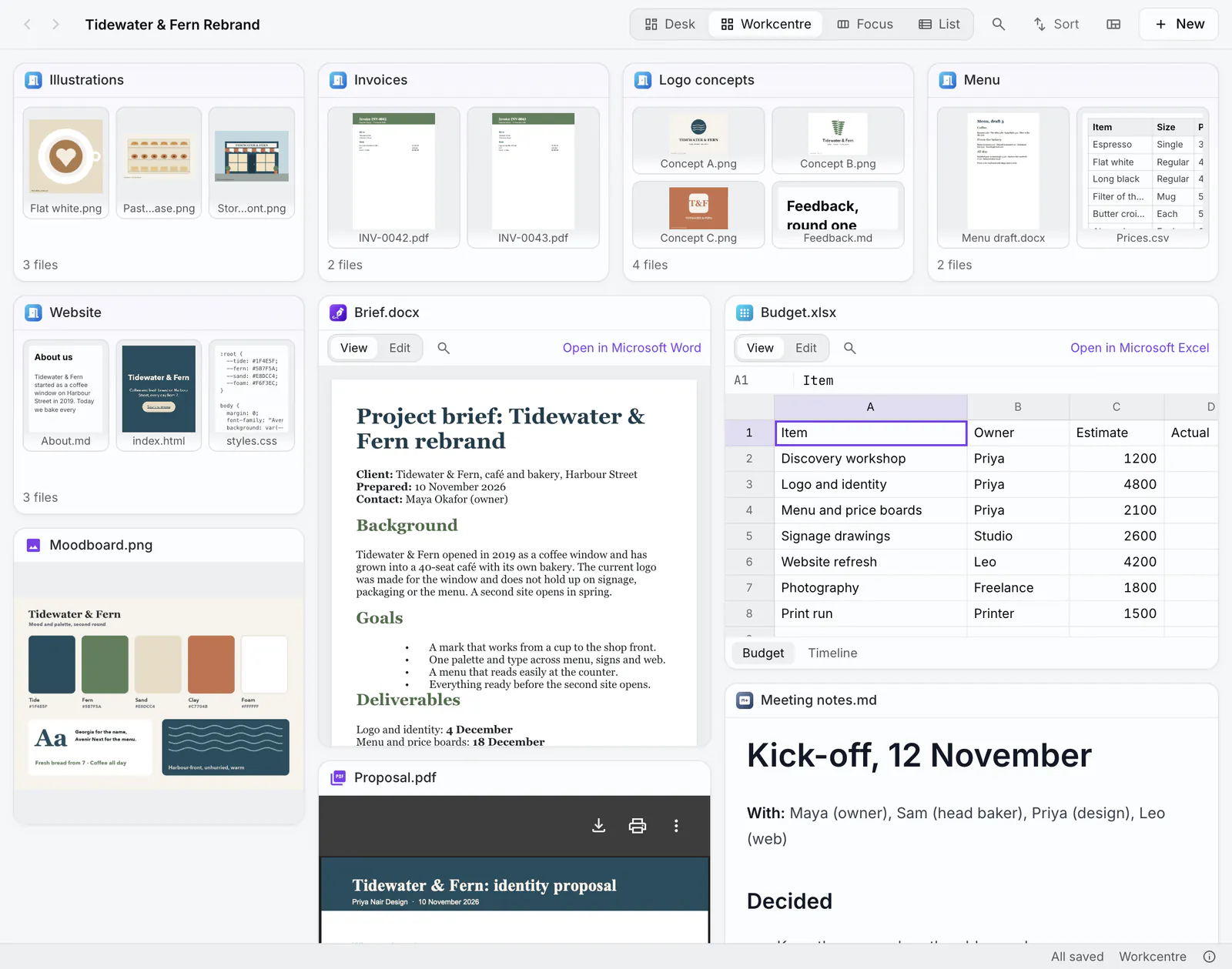
PlexiiLite is a visual file explorer for your Mac, from the makers of Plexii. Open a folder and it becomes a room: every file is a tile that shows what is in it, and every folder is a door you can see into. You read, edit and find inside your files right where they are, and the files stay in the folders they are in.
PlexiiLite and Finder side by side
Finder details checked 13 Nov 2026 on its maker's own pages (listed at the end).
| Question | PlexiiLite | Finder |
|---|---|---|
| What it is | A visual file explorer: a folder becomes a room, every file a tile that shows what is in it, every folder a door you can see into. | The file manager built into macOS. |
| Price | Free to download and use. | Built into every Mac. |
| Views | Desk (a free canvas), Workcentre (tiles that fill the window and snap), Focus (up to four files side by side) and List. | Icons, list, columns and gallery, with a Preview pane. |
| Windows and tabs | More than one window, and macOS tabs. | Folders can open in tabs, and Window › Merge All Windows makes one tabbed window. |
| Seeing inside files | Pictures, videos, PDFs, Markdown, code, Word documents, spreadsheets, presentations and web links open inside their tiles; Space gives a larger look. | Quick Look previews almost any file with the Space bar; the Preview pane and gallery view show the selected file. |
| Editing | Word, Excel, PowerPoint and CSV edited in place; pictures cropped, turned, resized and drawn on; PDFs marked up as standard annotations; Markdown edited beside its preview. | Markup from Quick Look and the toolbar, and Quick Actions such as rotate and create a PDF. Documents open in their own apps to edit, such as Preview for PDFs and images. |
| Finding | ⌘P finds files and folders by name across the folders you have open; ⇧⌘F searches the words inside them, including words in screenshots and scanned PDFs, read on your Mac. | The Finder search field searches your Mac or the open folder, and Spotlight finds apps, files, emails, messages and more. |
| Servers and cloud | Opens the folders your Mac can reach, and labels files kept only in iCloud, Dropbox, Google Drive or OneDrive. It has no server connections of its own. | Go › Connect to Server connects to shared computers and servers that use protocols such as SMB, and to WebDAV servers. iCloud Drive is in the sidebar. |
| Renaming and zips | Rename several items at once (replace text, add text or a name format), and Compress and Expand .zip files, as Finder does. | Rename multiple items (replace text, add text or change the name format), and Compress to .zip or double-click to unzip. |
| Extras | A terminal in the window, the folder's git changes and history, and AI that asks about a room with your own Anthropic key. | Tags with keyboard shortcuts, iCloud Drive with sync status, and Quick Actions. |
| Your files | Works on the same folders Finder sees. Layouts live in the app, never in your folders; ⌘Z undoes a move, rename or Trash. | Your files, as macOS keeps them. |
| Runs on | Macs with Apple Silicon or Intel, on macOS 12 Monterey or later. | Every Mac. |
When to stay with Finder
Stay with Finder alone if you mostly open, move and share files and are happy opening each one in its own app. It is built in, it is everywhere in macOS, and it connects to servers that PlexiiLite only reaches through it.
When to try PlexiiLite
Add PlexiiLite when you want to see what is inside a folder before you open it, read and edit documents, sheets, pictures and PDFs in place, and search the words inside them, including words in pictures and scans.
When PlexiiLite isn't the right fit
PlexiiLite isn't the right fit if you need it on Windows or a phone, or if you want an app that connects to servers itself.
See inside your folders.
PlexiiLite is a Mac app. Open this page on your Mac to download it.
Questions
Does PlexiiLite replace Finder?
No. It works beside Finder on the same folders. Finder still does what it does, and the files stay where they are.
Does PlexiiLite change my folders?
Only when you do. Moving a tile moves the file, and Undo puts it back. How you arrange a room is kept in PlexiiLite, never written into your folders.
Do Finder tags still work?
Yes. Finder tags work in PlexiiLite, and so do ⌘C and ⌘V for files and dragging a tile out to Mail or the Desktop.
Which Macs does PlexiiLite run on?
Macs with Apple Silicon or Intel, on macOS 12 Monterey or later, from one universal installer.
More comparisons: Finder alternatives for Mac.
Checked 13 Nov 2026 against each maker's own pages. Apple: support.apple.com: Organize your files in the Finder, Preview a file, Change Finder settings, Rename files, folders, and disks, Zip and unzip files and folders, Connect your Mac to shared computers and servers, Connect to or disconnect from a WebDAV server, Tag files and folders, Store files in iCloud Drive, Find what you need with Spotlight. PlexiiLite: plexiidesk.com/plexiilite (version 0.7.2). Features and plans change, so check each maker's site before you decide. Names are their owners' trademarks; this page is not made with or endorsed by them.