The real cost of context switching, and how to switch less
Switching between tasks costs time and the thread you were holding. What the research says, and practical ways to switch less and recover faster.
Context switching is what happens every time you put one piece of work down and pick up another: the report for an email, the email for a quick question in chat, the chat for a meeting, then back to the report. Each switch feels small. Added up, they explain a familiar kind of day, busy from start to finish with little that is actually finished.
This guide covers what a switch costs, why the way most of us set up our tools makes it worse, and the habits that help on both fronts: switching less often, and making the switches you can't avoid cheaper.
What a switch actually costs
In a laboratory study of task switching published in 2001, Joshua Rubinstein, David Meyer and Jeffrey Evans ran four experiments. In them, people either alternated between tasks or repeated the same one: classifying geometric shapes by different rules, or solving arithmetic problems with different operations. The researchers measured how much time switching cost.
Their summary of the result is a single sentence: "Task alternation yielded switching-time costs that increased with rule complexity but decreased with task cuing." (abstract on PubMed (opens in a new tab))
There are three useful findings in that sentence:
- Switching costs time. Alternating between tasks carried a time cost that repeating the same task did not.
- The cost grows with complexity. The more complicated the rules of the task, the longer the switch took.
- Clear cues make it smaller. When people had visual cues telling them which task to do, switching cost less.
The tasks were laboratory exercises, so the study doesn't say how much of a working day switching takes up, and it gives no single percentage for it. Be wary of any precise figure you see attached to "the cost of multitasking". What the study does give is a direction: switches cost something, more complex tasks cost more to switch into, and good cues reduce the cost. Everything below follows from those three points.
There is also a cost the stopwatch doesn't catch: the thread you were holding. Halfway through a piece of thinking, you know which option you ruled out and why, what the next sentence should say, which number looked wrong. Switch away, and much of that has to be rebuilt when you come back.
Why switching apps makes it worse
Most software is organised by type: one app for documents, one for spreadsheets, one for mail, one for chat, and a browser holding everything else in tabs. Most work is organised by task: a proposal, a launch, a client, an essay. So each piece of work ends up spread across several apps, and coming back to it means putting it back together. Which document was the latest? Where was that tab? What did the client say, and in which thread?
That reassembly is an extra switch on top of the first one. It also takes away something the research found helps: a clear cue. There is no single place that says "this is the task, and this is where you were".
This mismatch is the reason PlexiDesk is built around organising work by task instead of by app, and our post One desk per task: why we built Plexii explains the thinking behind it. The habits below work with whatever tools you use, so start with them.
Switch less: batch, block and decide in advance
You can't take switching out of a working week, but you can do much less of it.
- Batch similar work. Messages, approvals, expenses and small admin are all switches waiting to happen. Deal with them together at set times rather than as they arrive. Try two or three message sessions a day, then adjust to what your job really needs.
- Protect a first block. Choose one stretch of the day, often the first, for your hardest piece of work, and keep it clear of meetings and messages. In the study, switches cost more when the rules were more complex, so give the most complex work the time least likely to be broken up.
- Decide in advance. Choosing what to do next is itself a small task. Pick tomorrow's first piece of work before you stop today, so that when the block starts there is nothing left to decide.
- Let interruptions queue. Keep a capture list beside you. When something occurs to you mid-task, write it down in a few words and carry on. Most of it can wait until the block ends.
- Tell people when you're reachable. If colleagues know when you'll reply, they have less reason to interrupt. A status line or a block in a shared calendar does this without a conversation.
- Finish to a stopping point. If you have to switch, finish the paragraph, the row or the call note first. A finished sentence is far easier to pick up than half of one.
Make the switches you can't avoid cheaper
Some switching is the job. Managers, assistants and anyone who supports other people are interrupted by design. For those switches, the aim is a quicker recovery.
- Leave yourself a note. Before you switch, take half a minute to write down where you are and what the next step is. Our guide to writing a re-entry note has a four-line format.
- Stop where the next step is obvious. "Next: check the Q3 column against the invoice" is much easier to restart from than "carry on with the budget".
- Match the task to the gap. With ten minutes between meetings, pick something with simple rules, such as replies or filing, and keep complex work for longer stretches. It is a reasonable reading of the finding that complexity raises the cost of a switch.
- Keep the cue visible. The name of the task and its next step, somewhere you'll see them as soon as you come back, is the everyday version of the cues that made switching cheaper in the study.
Give each piece of work one place to return to
A place makes a good cue. When everything for a piece of work lives in one spot, coming back to it takes one step instead of ten. You can do this with a folder and a notes file. PlexiDesk is built around the idea.
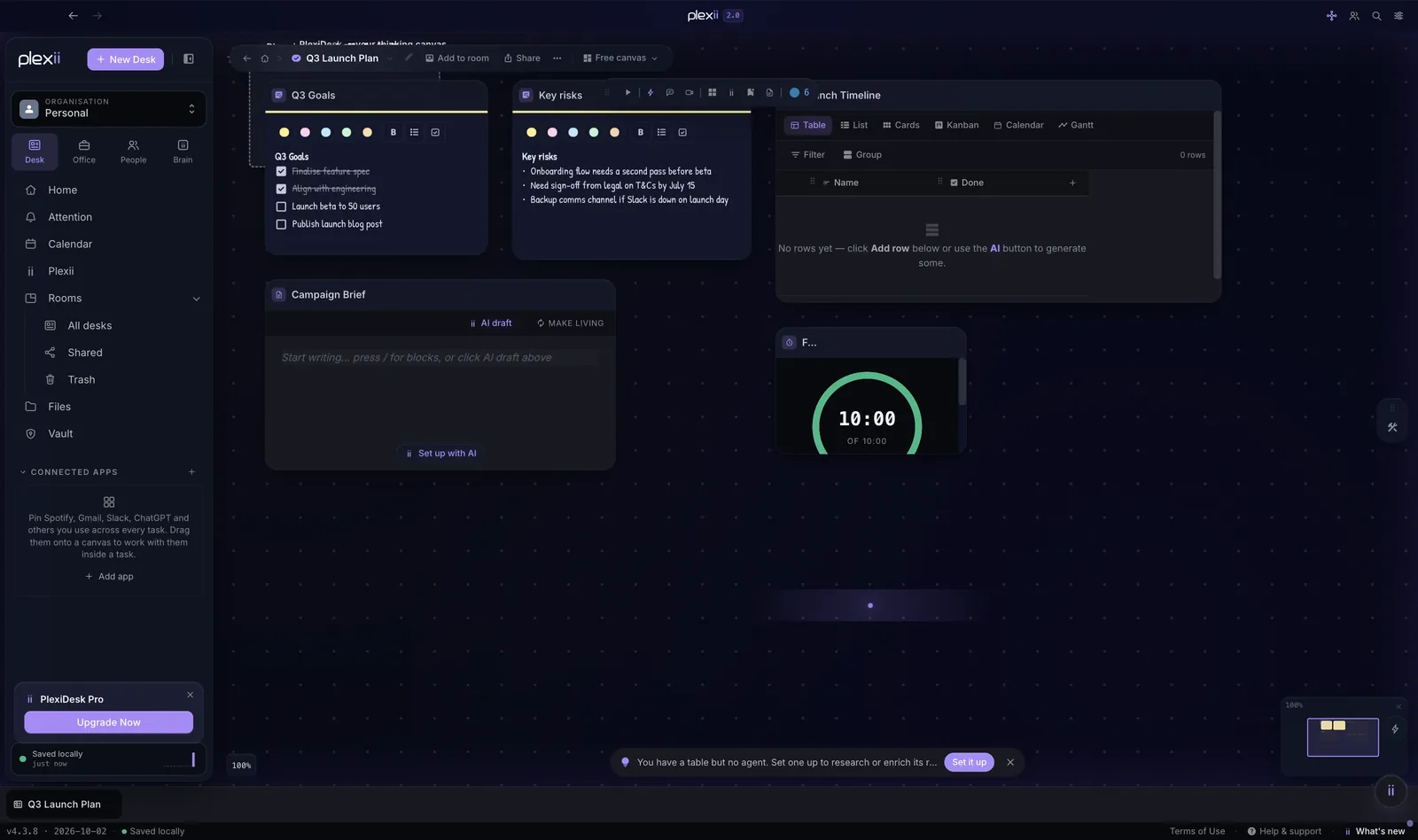
- A desk for each piece of work. A desk is one canvas for one piece of work, holding its notes, tables, files, timers and browser windows. When you create one you can also give it notes, a due date and an estimate of how long it will take. Each Browser widget on a desk remembers the page it was on, so the desk opens the way you left it. See Desks, rooms and the canvas.
- Switch in one click. The open-items strip keeps a tab just above the footer for each desk, room, document and app you have open. Click a tab to switch. Pin the ones you use all day so they stay at the left and are never pushed out; the strip holds up to 12 tabs. Closing a tab only clears the strip. It never closes or deletes the work itself.
- Get back after an interruption. The Where was I widget on your Home dashboard shows the desk you last worked on, how long ago that was and the last web page you opened in a Browser widget, with a Resume button that opens the desk. It needs no AI, and it is on every plan.
To be clear about what this does and doesn't do: PlexiDesk doesn't stop interruptions. The meeting still happens and the message still arrives. What changes is the cost of coming back, because the work is waiting where you left it, one click away.
Try it on one task this week
Try these habits on something real. Pick one piece of work you keep returning to, such as a proposal, a monthly report or a client, and for one week:
- Give it one home. A desk, a folder or a notebook: one place, with everything for that work in it or linked from it.
- Write its next step before you stop, every time, somewhere you'll see it when you come back.
- Batch the small stuff around it, and give it one protected block each day.
- Notice the restarts. At the end of the week, ask yourself whether picking it up got quicker.
If it did, do the same for the next piece of work. One piece of work at a time is easier to keep up than reorganising everything in a weekend.
If you'd like to try it in PlexiDesk, build a desk for your own role in the interactive demo, or read more about how a desk keeps each task in one place.
For more on keeping work together, read Too many tabs open? A calmer way to keep your research and A simple system for organising project files, notes and links.